🎧 Audiobook Player
BookLore includes a dedicated audiobook player for M4B, M4A, and MP3 files. It supports chapter navigation, playback speed control, sleep timers, bookmarks, and automatic progress tracking.
🎵 Player Interface
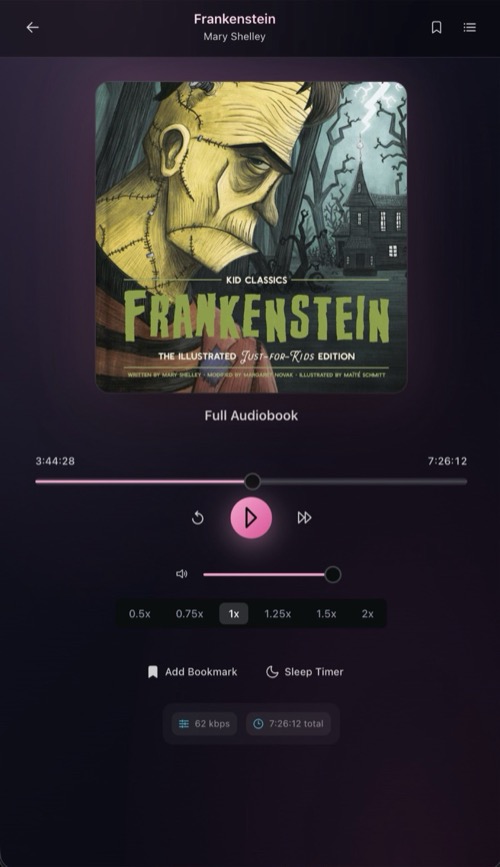
The player displays the book cover, title, and author at the top, with playback controls below. The header includes a back button, bookmark toggle, and a menu button to open the chapter/track list.
🎛️ Playback Controls
| Control | Action |
|---|---|
| Play / Pause | Start or pause audio playback |
| Rewind 30s | Seek backward 30 seconds |
| Forward 30s | Seek forward 30 seconds |
| Previous | Jump to the previous track or chapter |
| Next | Jump to the next track or chapter |
A progress slider shows the current position within the track. Drag it to seek to any point.
🎚️ Playback Speed
Six speed presets are available below the main controls:
| Speed | |||||
|---|---|---|---|---|---|
| 0.5x | 0.75x | 1x (default) | 1.25x | 1.5x | 2x |
The selected speed persists for the current session. Listening time in reading sessions is adjusted to account for the playback rate.
🔊 Volume
A volume slider and mute toggle sit below the playback controls. The mute button icon changes based on the current level. Clicking it toggles between muted and the previous volume.
📑 Chapter & Track List
Open the sidebar from the menu button in the header to see all chapters or tracks:
- Folder-based audiobooks (multiple files) show each track with its title and duration.
- Single-file audiobooks (M4B) show embedded chapters with title and duration.
Click any entry to jump directly to it. The currently playing item is highlighted with a pulsing indicator.
🔖 Bookmarks
Click Add Bookmark to save your current position. Bookmarks are named automatically using the track/chapter name and timestamp. Open the bookmark sidebar from the header to view all bookmarks, jump to a saved position, or delete bookmarks you no longer need.
😴 Sleep Timer
The Sleep Timer menu offers timed auto-pause options:
| Option | Description |
|---|---|
| 15 min | Pause after 15 minutes |
| 30 min | Pause after 30 minutes |
| 45 min | Pause after 45 minutes |
| 60 min | Pause after 60 minutes |
| End of Chapter | Pause when the current chapter ends |
When a timer is active, the button displays the remaining time. In the final 30 seconds, volume gradually fades out before playback stops.
📊 Progress Tracking
Progress is saved automatically every 5 seconds during playback and whenever you pause. When you reopen an audiobook, playback resumes from your last position, including the correct track for multi-file audiobooks.
The footer shows bitrate and total duration at a glance.
🎮 Hardware Media Controls
The player integrates with your device's media controls (headphone buttons, lock screen, car stereo, smartwatch) through the Media Session API. Play, pause, skip forward/back, and track navigation all work from external hardware controls.
📈 Listening Sessions
Listening sessions are recorded automatically. Each session tracks the start and end time, total listening duration (adjusted for playback speed), and position data. Sessions shorter than 30 seconds are discarded. Session data appears in the book's Metadata Center under Reading Sessions.