📓 Notebook
The Notebook is a centralized view of all your highlights, notes, and bookmarks across every book in your library. Access it from the sidebar navigation.
📖 Overview
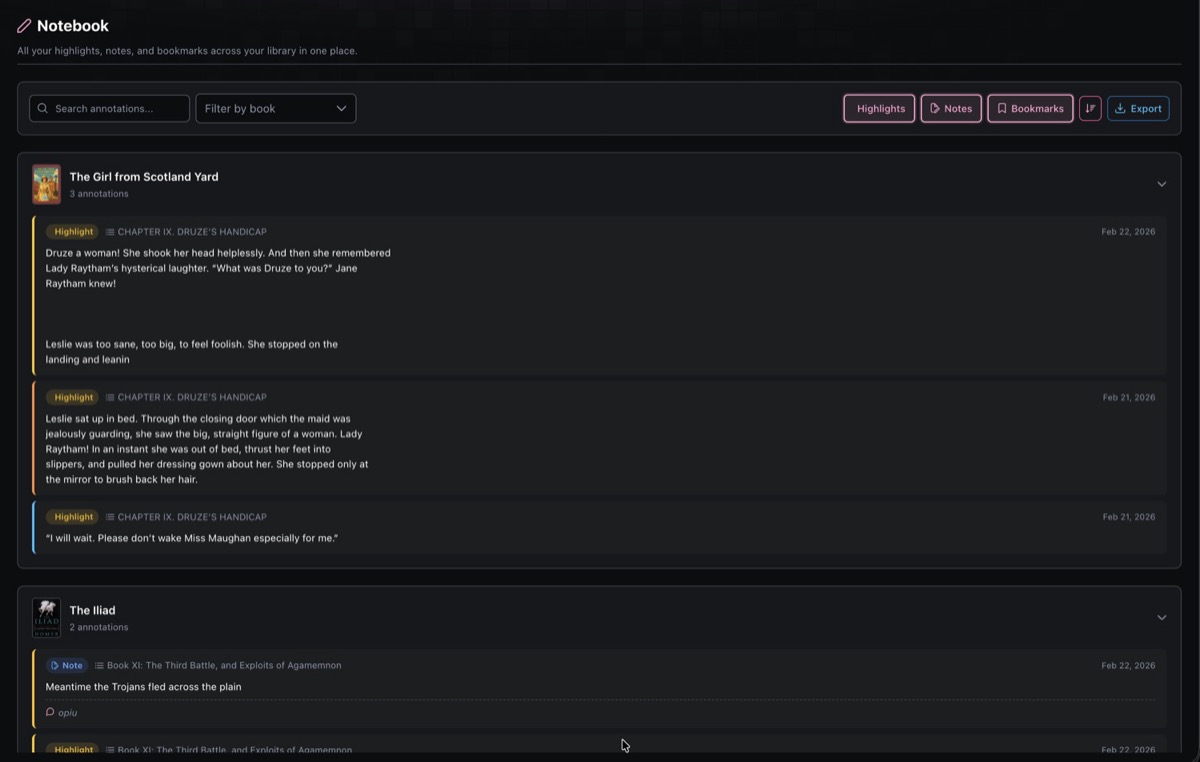
Annotations are grouped by book. Each book section shows a thumbnail, title, and annotation count, and can be collapsed or expanded. Individual entries display the annotation type (colored badge), chapter name, content, and creation date.
🏷️ Annotation Types
| Type | Badge | Description |
|---|---|---|
| Highlight | Yellow | Text passages you highlighted in the EPUB reader |
| Note | Blue | Notes you attached to text in EPUB or comic readers |
| Bookmark | Green | Positions you bookmarked in any reader |
🔍 Filtering & Search
The toolbar at the top offers several ways to narrow down your annotations:
- Search text input filters annotations by content (with a short debounce)
- Filter by book dropdown lets you scope to a single book
- Type toggles (Highlights, Notes, Bookmarks) can be toggled independently to show or hide each type
All filters can be combined. For example, show only highlights from a specific book that match a search term.
🔃 Sorting
A sort toggle switches between:
- Newest first (default) sorted by creation date descending
- Oldest first sorted by creation date ascending
📤 Export
Click the Export button to download all matching annotations as a Markdown file (notebook-export.md). The export respects your active filters, so you can export just the highlights from one book, or everything at once.
The exported file includes:
- Entries grouped by book title
- Chapter headings where available
- Highlighted text in blockquote format
- Associated notes with a "Note:" prefix
The export button is disabled when there are no entries to export.
📄 Pagination
Results are paginated with a default page size of 50. You can switch to 25 or 100 entries per page. The paginator only appears when total results exceed the page size.