💳 Pocket ID
This guide walks you through setting up Pocket ID as an OIDC provider for Booklore. Pocket ID is a lightweight, self-hosted identity provider that's especially popular in homelabs for its simplicity. If you just want SSO without the complexity of a full-featured provider, Pocket ID is a great choice.
By the end of this guide, your users will be able to sign in to Booklore with their Pocket ID account. The setup takes about 3 minutes.
This guide covers the initial setup. For details on user provisioning, group mapping, OIDC-Only Mode, and other advanced features, see the OIDC Settings reference.
🚀 Part 1: Create an OIDC Client in Pocket ID
Open your Pocket ID admin panel and go to Settings > Administration > OIDC Clients. Click Add OIDC Client.
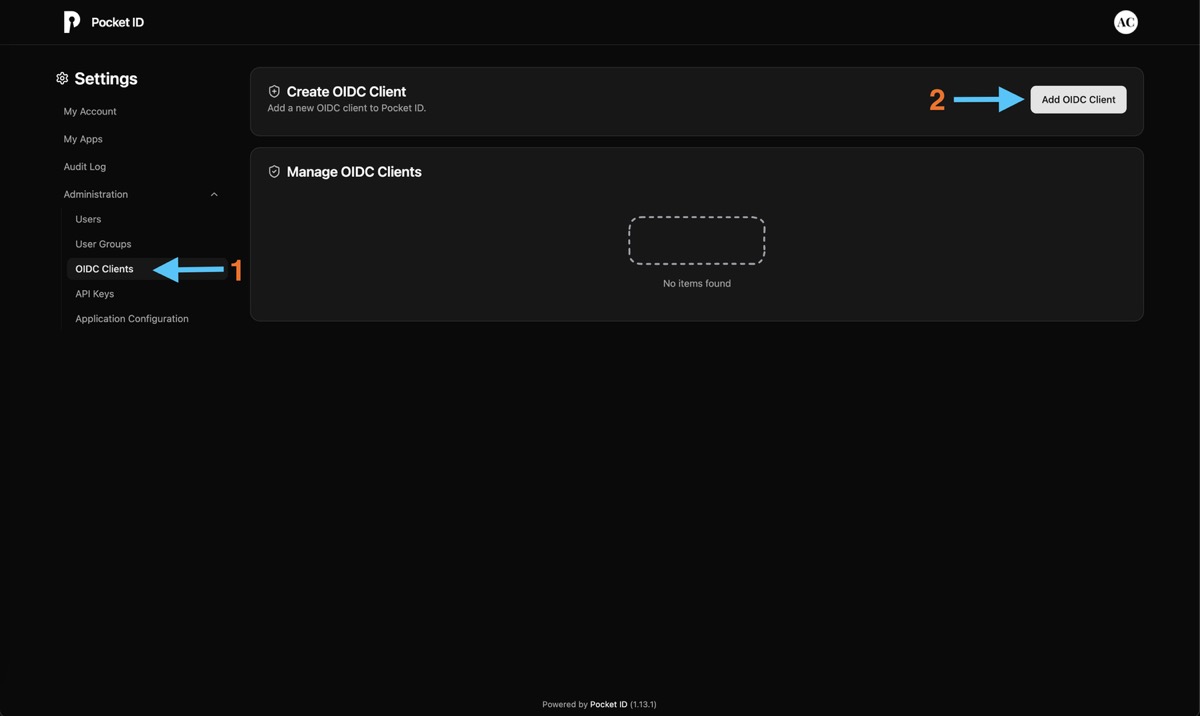
Fill in the client configuration:

| Field | Value | Notes |
|---|---|---|
| Name | Booklore | Shown to users in the Pocket ID dashboard |
| Callback URLs | https://books.example.com/oauth2-callback | Replace with your actual Booklore domain |
| Public Client | ON | Booklore uses PKCE, so no client secret is needed |
| Client Launch URL | https://books.example.com/ | The URL where users access Booklore |
After you configure the provider in Booklore (Part 3), the OIDC settings page shows a Provider Configuration Reference panel with the exact Redirect URI. You can come back to Pocket ID and update the callback URL to match.
Local development example:
Callback URLs: http://localhost:4200/oauth2-callback
Client Launch URL: http://localhost:4200/
Click Save.
🔑 Part 2: Get Your Credentials
After saving, Pocket ID generates a Client ID for your application.

Copy it. You'll also need your Issuer URL, which is simply your Pocket ID base URL:
| Value | Example |
|---|---|
| Client ID | a1b2c3d4-e5f6-7890-abcd-ef1234567890 |
| Issuer URL | https://pocket-id.example.com |
⚙️ Part 3: Configure Booklore
Navigate to Settings > OIDC in Booklore.
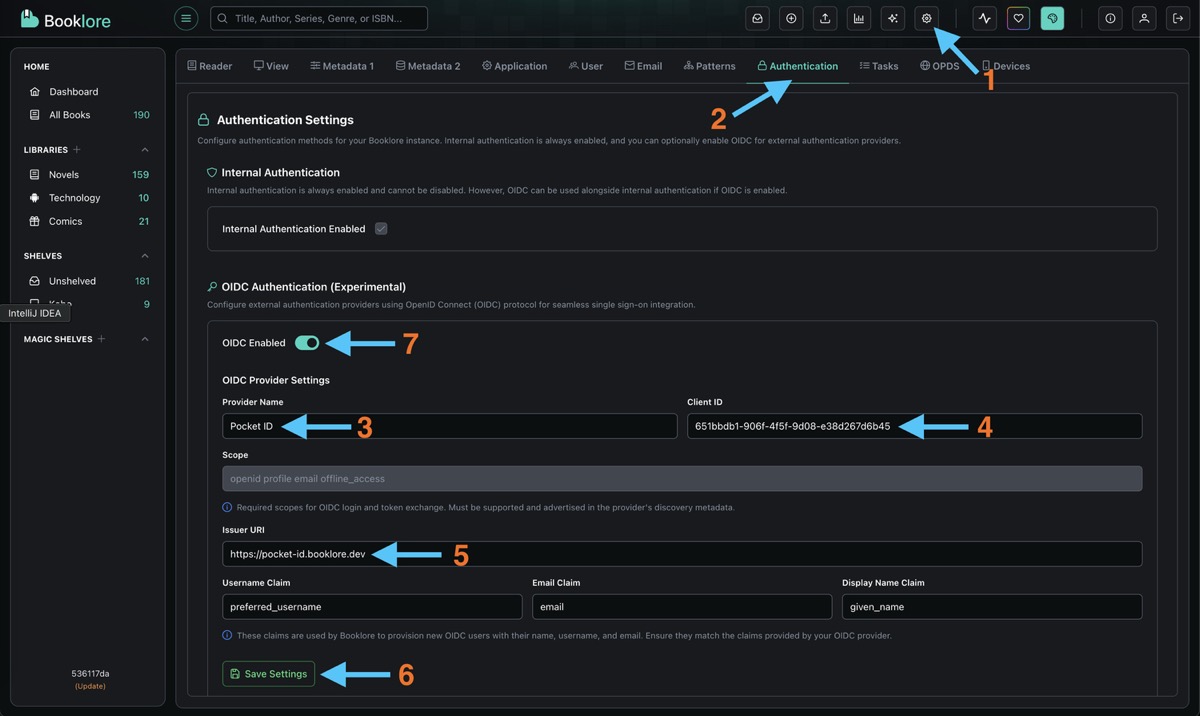
Fill in the provider configuration:
| Field | Value |
|---|---|
| Provider Name | Pocket ID (shown on the login button) |
| Client ID | Paste the Client ID from Pocket ID |
| Client Secret | Leave empty (public client) |
| Issuer URI | Your Pocket ID URL (e.g., https://pocket-id.example.com) |
The default claim mappings work with Pocket ID out of the box:
| Claim | Value |
|---|---|
| Username | preferred_username |
email | |
| Display Name | name |
| Groups | groups |
Click Test Connection to verify Booklore can reach Pocket ID. All checks should pass.
Click Save, then toggle OIDC Login to ON in the Login Methods section.
🧪 Test It
Open your Pocket ID dashboard and go to My Apps. You should see the Booklore application card.
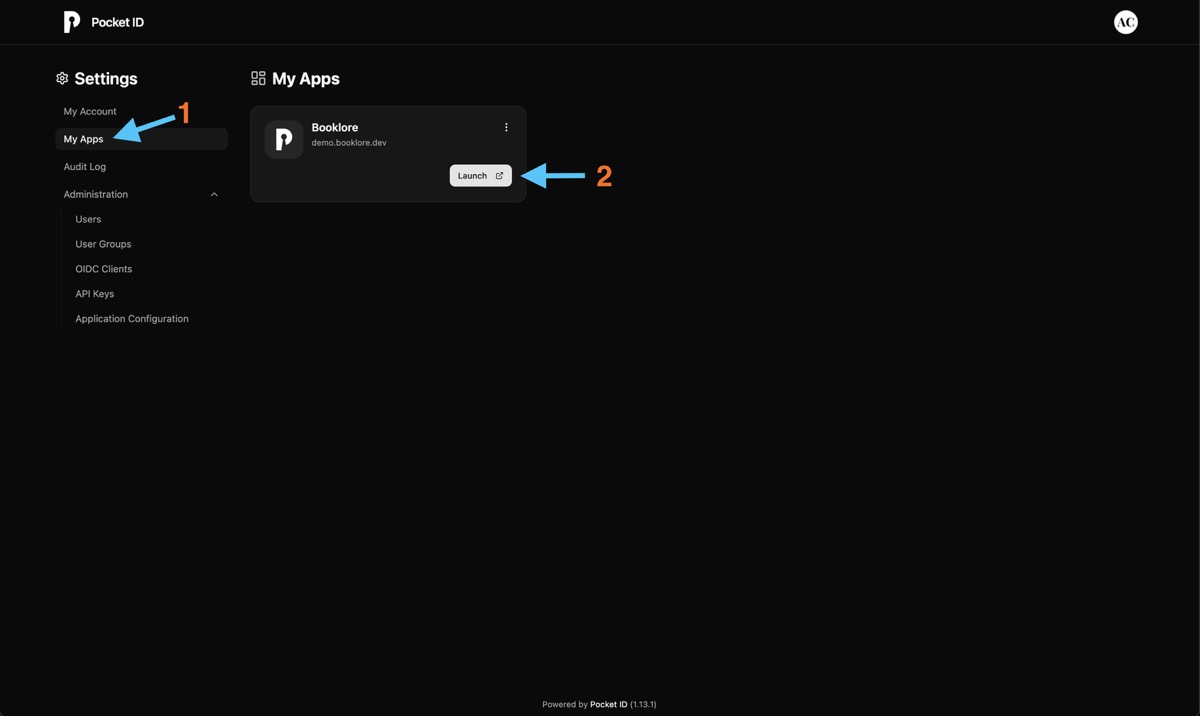
Click the Booklore card. Pocket ID handles the authentication and redirects you to Booklore.
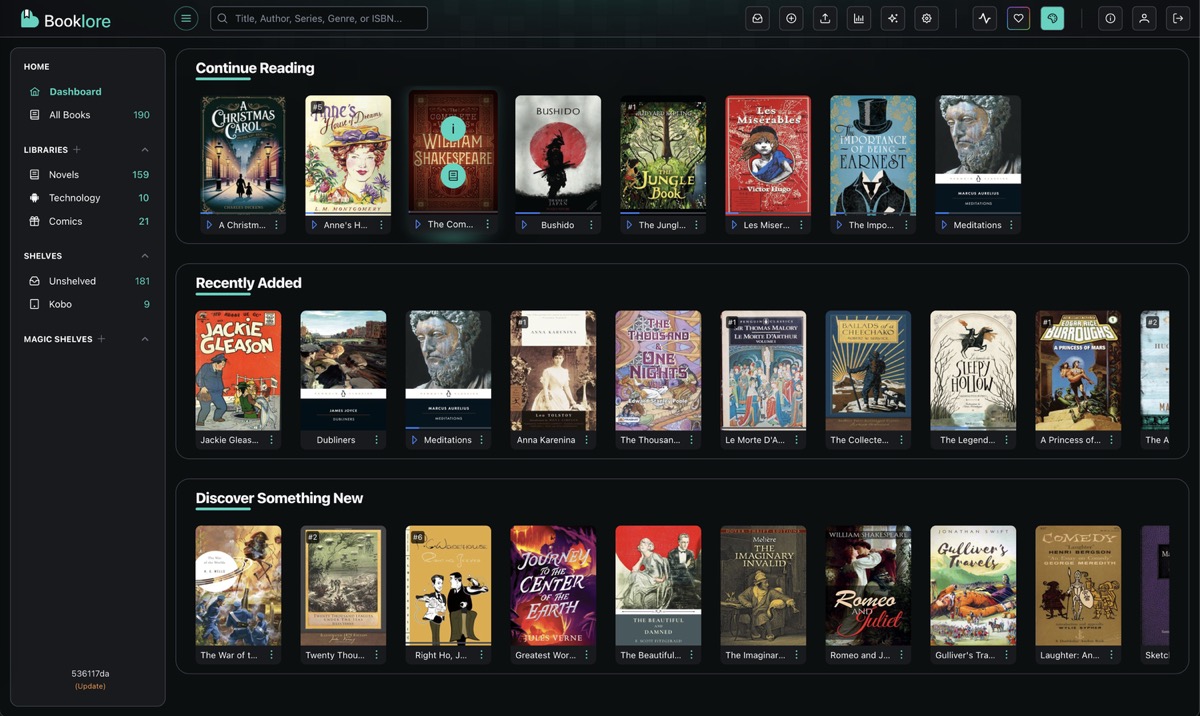
You should be logged in automatically. Verify that your username and email are correct.
Alternative: Open an incognito window, go to your Booklore instance, and click "Sign in with Pocket ID".
🔧 What's Next
Now that basic OIDC is working, you can configure additional features in Booklore's OIDC Settings:
- User Provisioning: Automatically create Booklore accounts when users sign in for the first time
- Group Mapping: Map Pocket ID groups to Booklore permissions and library access
- OIDC-Only Mode: Hide the local login form and redirect everyone to Pocket ID
- Account Linking: Migrate existing local users to OIDC without losing their data
🛠️ Troubleshooting
Login Redirects But Fails
- The Callback URL in Pocket ID must match the Redirect URI from Booklore's Provider Configuration Reference panel exactly.
- Make sure Public Client is toggled ON in Pocket ID.
- Verify the Client ID has no extra spaces.
"User Not Provisioned" Error
Auto-provisioning is off by default. Either enable it in OIDC Settings, or create a Booklore user with a username that exactly matches the Pocket ID username (case-sensitive).
"Invalid Client" Error
- Double-check the Client ID. Copy it fresh from Pocket ID.
- Make sure the Issuer URI matches your Pocket ID URL exactly.
Booklore Can't Reach Pocket ID
If Test Connection fails, Booklore's server can't reach the Pocket ID discovery endpoint. Common causes:
- If both run in Docker, make sure they're on the same network or that the external URL is reachable from Booklore's container.
- Check DNS resolution: can the Booklore container resolve the Pocket ID hostname?
- Check firewall rules between the two services.
Can't Access Booklore At All
- Admin backdoor:
/login?local=true - Nuclear option: set
FORCE_DISABLE_OIDC=trueas an environment variable and restart