🔑 Hardcover API Token Setup
Hardcover is a comprehensive book tracking and discovery platform that provides rich metadata for books. By configuring a Hardcover API token in Booklore, you can access detailed book information, ratings, and reviews to enhance your book metadata collection.
The Hardcover API provides access to an extensive database of book information, including covers, descriptions, ratings, and community reviews. Using an API token ensures reliable access to this metadata source.
Hardcover provides rich metadata including covers, descriptions, ratings, review counts, moods, and tags - perfect for enhancing your book collection.
🛠️ Step 1: Create a Hardcover Account
- Visit Hardcover by navigating to https://hardcover.app
- Sign up for an account or log in if you already have one
- Complete your profile setup to ensure full access to API features
🔧 Step 2: Access API Settings
- Navigate to your account settings by going to https://hardcover.app/account/api
- Log in to your account if prompted
- Locate the API section in your account settings
Your token should start with "eyJ" and be a long alphanumeric string. Do NOT include the "Bearer " prefix when pasting into Booklore.
📡 Step 3: Generate Your API Token
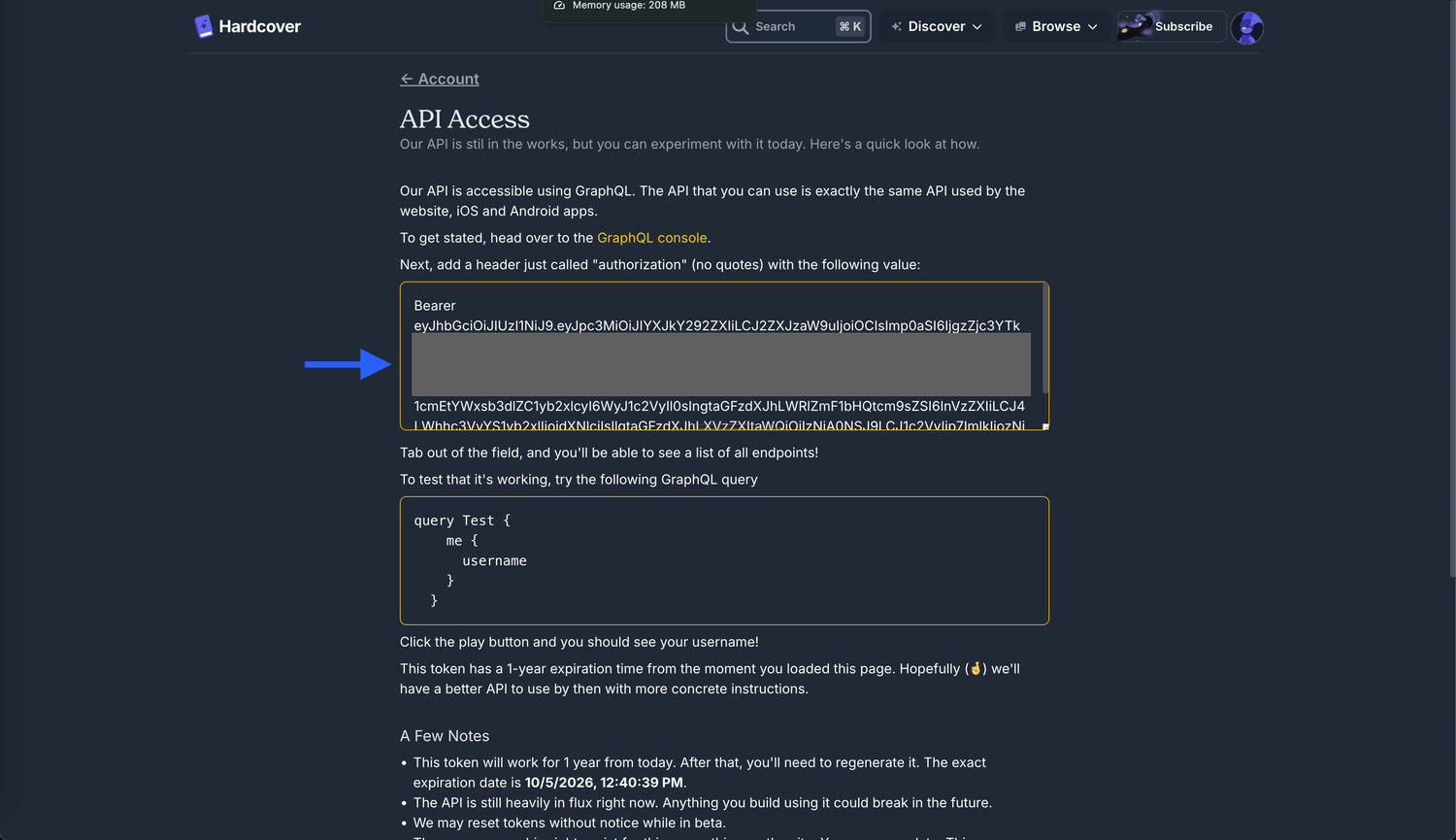
- Find the API Token section on the API settings page
- Generate a new token if you don't already have one
- Copy the complete token except the 'Bearer' - it will look like:
eyJhbGciOiJIUzI1NiJ9.eyJpc3MiOiJIYXJkY292ZXIiLCJ2ZXJzaW9uIjoiOCIsImp0aSI6IjIwMDI1ZDkxLWRhM2YtNDk5MS05ZmI1LWJkMTJkZmE0ZDg2ZiIsImFwcGxpY2F0aW9uSWQiOjIsInN1YiI6IjM2MDQ1IiwiYXVkIjoiMSIsImlkIjoiMzYwNDUiLCJsb2dnZWRJbiI6dHJ1ZSwiaWF0IjoxNzU5Njg5MjM4LCJleHAiOjE3OTEyMjUyMzgsImh0dHBzOi8vaGFzdXJhLmlvL2p3dC9jbGFpbXMiOnsieC1oYXN1cmEtYWxsb3dlZC1yb2xlcyI6WyJ1c2VyIl0sIngtaGFzdXJhLWRlZmF1bHQtcm9sZSI6InVzZXIiLCJ4LWhhc3VyYS1yb2xlIjoidXNlciIsIlgtaGFzdXJhLXVzZXItaWQiOiIzNjA0NSJ9LCJ1c2VyIjp7ImlkIjozNjA0NX19.sKkra-37Wdw1jAsYhc-1LXRnopL9_whvilmitRs1FYw
Copy only the token portion - everything AFTER "Bearer ". Do not include the word "Bearer" or the space after it.
⚙️ Step 4: Configure Booklore
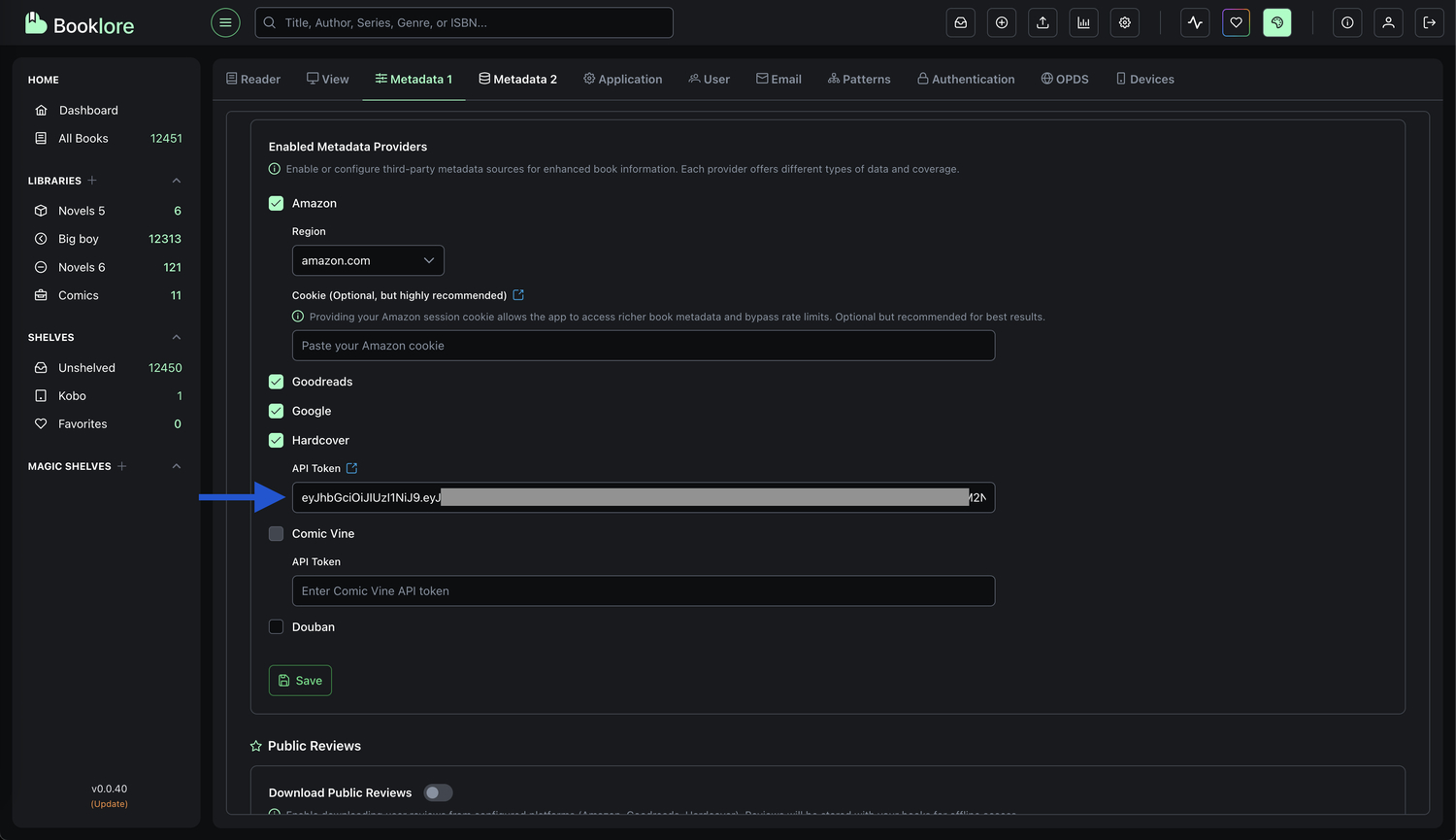
- Open Booklore settings
- Navigate to the 'Metadata 1' section
- Find the "Hardcover API Token" field
- Paste only the token portion (everything after "Bearer "):
eyJhbGciOiJIUzI1NiJ9.eyJpc3MiOiJIYXJkY292ZXIiLCJ2ZXJzaW9uIjoiOCIsImp0aSI6IjIwMDI1ZDkxLWRhM2YtNDk5MS05ZmI1LWJkMTJkZmE0ZDg2ZiIsImFwcGxpY2F0aW9uSWQiOjIsInN1YiI6IjM2MDQ1IiwiYXVkIjoiMSIsImlkIjoiMzYwNDUiLCJsb2dnZWRJbiI6dHJ1ZSwiaWF0IjoxNzU5Njg5MjM4LCJleHAiOjE3OTEyMjUyMzgsImh0dHBzOi8vaGFzdXJhLmlvL2p3dC9jbGFpbXMiOnsieC1oYXN1cmEtYWxsb3dlZC1yb2xlcyI6WyJ1c2VyIl0sIngtaGFzdXJhLWRlZmF1bHQtcm9sZSI6InVzZXIiLCJ4LWhhc3VyYS1yb2xlIjoidXNlciIsIlgtaGFzdXJhLXVzZXItaWQiOiIzNjA0NSJ9LCJ1c2VyIjp7ImlkIjozNjA0NX19.sKkra-37Wdw1jAsYhc-1LXRnopL9_whvilmitRs1FYw - Save your settings
Your Hardcover integration is now active! Booklore can now fetch rich metadata from Hardcover.
🔧 Troubleshooting
If you're experiencing issues with the Hardcover integration:
- ✅ Ensure you removed the "Bearer " prefix from the token
- 🔑 Verify your Hardcover account is active and in good standing
- 📋 Check that you copied the complete token without any extra spaces
- 🔄 Try regenerating the token from your Hardcover account settings
API tokens typically have long expiration periods but can be revoked or regenerated at any time. If you encounter authentication errors, regenerate your token from the Hardcover API settings page.
Hardcover API tokens remain valid for extended periods. If you see authentication errors, check your account status or regenerate the token.